Showing posts with label Teacher Juan Antonio Rincón Carballo (coordinator). Show all posts

Wednesday, March 10, 2021

6º B: Así trabajamos en la práctica de Polonia, creación de posters

Mientras los alumnos Cibermentores trabajan con teacher Juan Antonio y Eva Mª Moriel, nuestros alumnos de 6º B nos explican la tarea que van a realizar sobre la buena práctica de Polonia. Hicimos 5 grupos y empezaron a trabajar con las orientaciones que les dábamos teacher Cristina y yo, teacher Ester. 

Mara y Diego nos lo cuentan. 


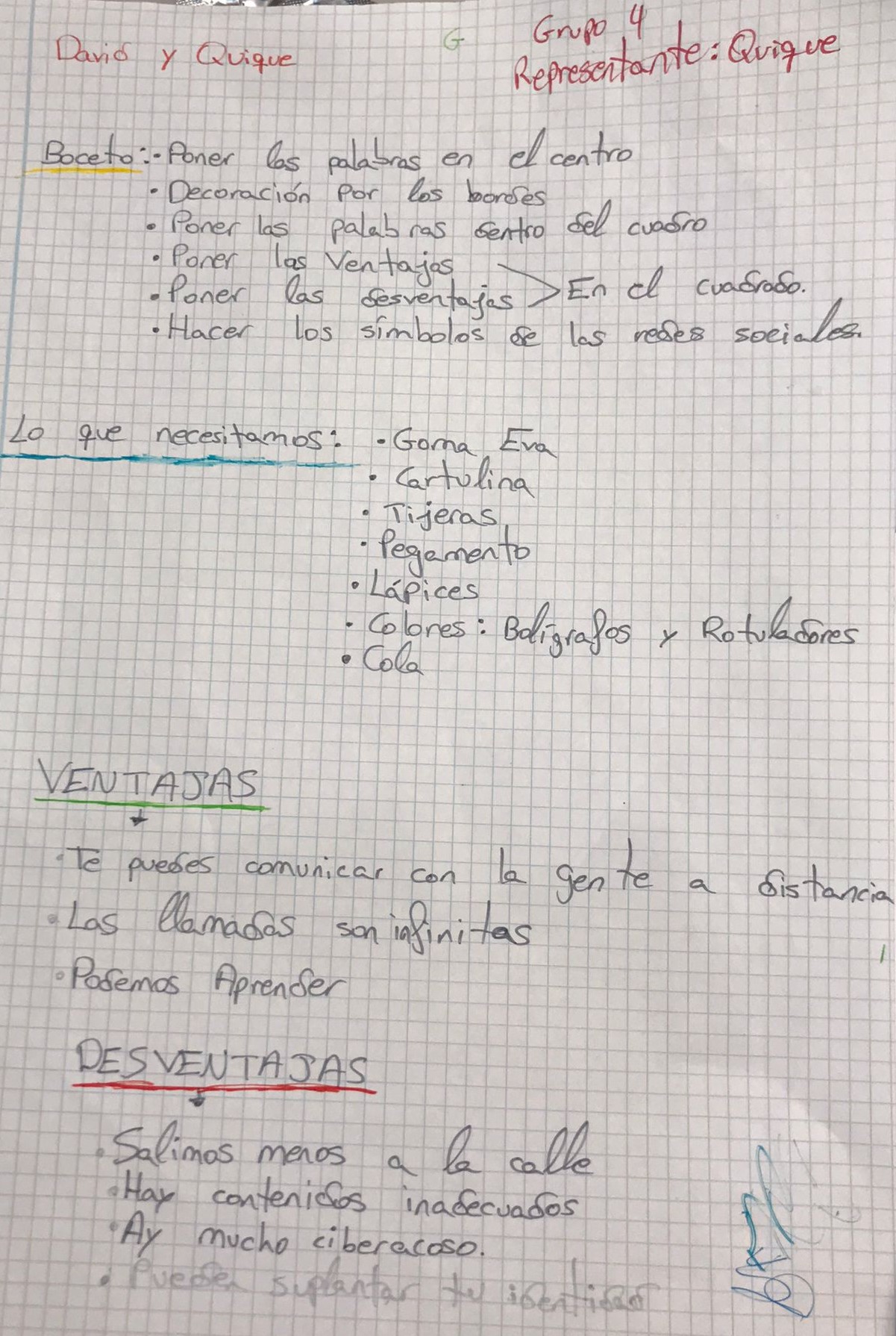
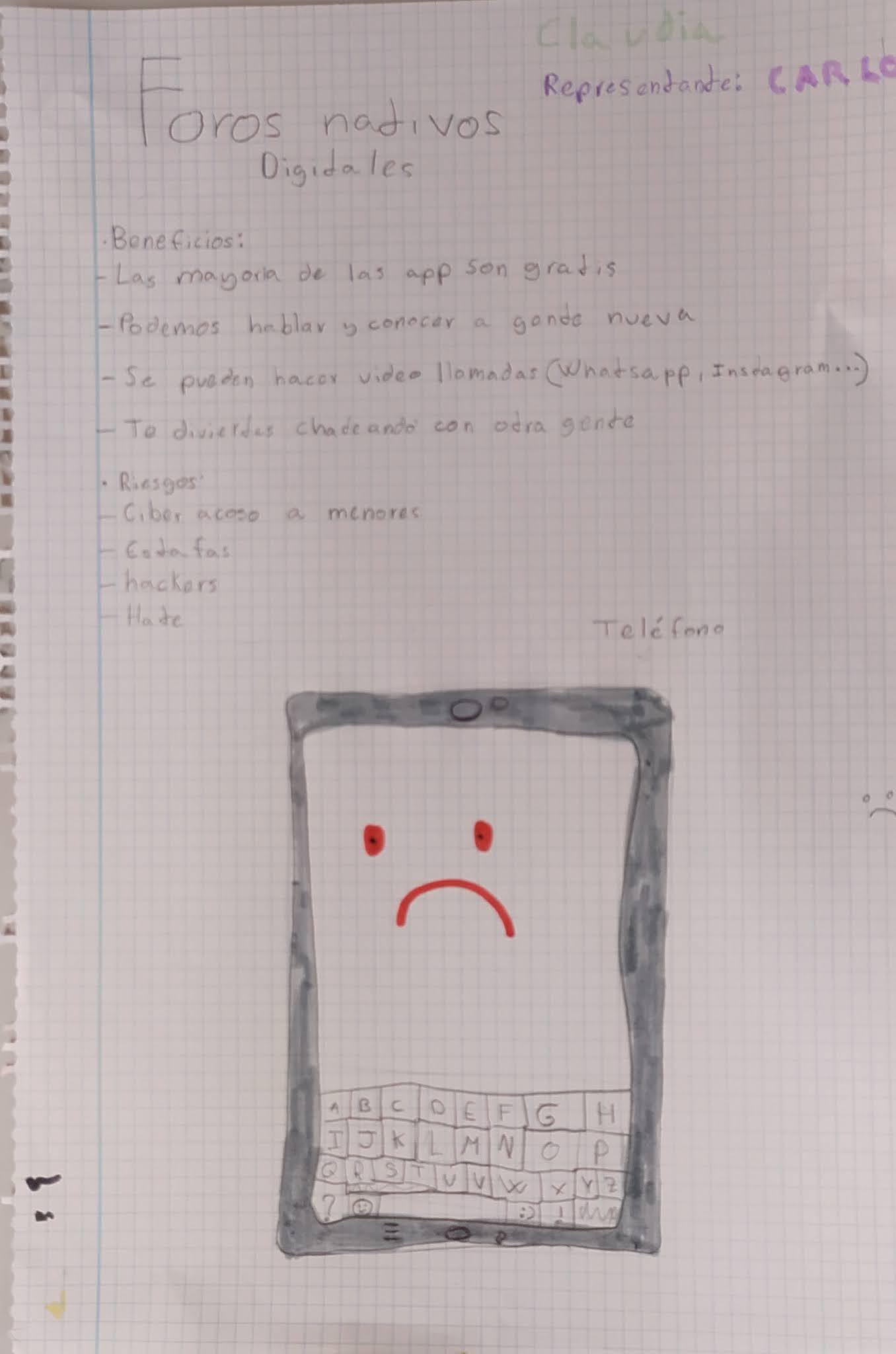
Hicimos grupos  de dos personas y teníamos que poner tres ventajas y desventajas sobre la comunicación en internet.

Nuestra maestra Cristina nos dijo que teníamos que hacer el boceto del póster para luego hacerlo con los materiales (cartulina grande, goma eva, ceras, rotuladores, pegamento...).

Grupo 1: Mara  y Diego


Grupo 2: Beatriz, César y Cristina


Grupo 3: Sara y Diana


Grupo 4: Quique y David


Grupo 5: Claudia y Carlos


Nos dio tiempo a hacer el boceto y en la siguiente sesión empezaríamos con el póster.

Ventajas:
- Puedes hablar con gente a distancia.
- Puedes leer los mensajes más tarde si no estás disponible.
- Mandar fotos y videos a cualquier persona.

Desventajas:
- Se malinterpretan los mensajes.
- Para algunas cosas tienes que pagar.
- Toda la gente no lo tiene, con lo cual no puedes hablar con esa persona.

We have five groups of two persons and we had to put three advantages and disadvantages about communication on the Internet.
Our teacher Cristina told us that first we had  to make the sketch and then the poster with the materials (Big carboard, eva gum, crayons, markers, glue...). 
We had time to make the sketch and in the next session we would start with the poster.

Advantages:
- You can talk to people remotely
- You can read messages later if you are not available.
- Send photos and videos to anyone. 

Disadvantages:
- Messages are misinterpreted.
- For some things you have to pay.
- All people don't have it, so you can't talk to that person.

Wednesday, May 27, 2020

Ultimando el trabajo de privacidad (6ºC) y ciberacoso (6ºB)


Esta semana las sesiones con nuestros alumnos de 6º curso, han sido para ir finalizando el TRABAJAZO que van a presentar a sus compañeros.

Como sabéis cada curso está trabajando un tema distinto. A continuación os explicamos de qué se va a ocupar cada uno.


6º A  FAKE NEWS

ÍNDICE
  • Elaboración del Logo: GONZALO ALMODÓVAR.
  • Punto de partida: PACOMIO GÓMEZ.
  • Qué son las FAKE NEWS: IRENE BARRANTES
  • Cómo identificar las FAKE NEWS: JAVIER GODOY.
  • Pasos a seguir: SARA BARRERO.
  • Tipos de noticias falsas.
  • Cómo combatirlas: IRENE BARRANTES.
  • Verificación de fotos en redes: JAVIER GODOY.
  • Websites que nos ayudan a identificar FN: JAVIER G.
  • Consejos: GONZALO ALMODÓVAR.
  • Documentación del proceso: GONZALO ALMODÓVAR.
  • Conclusiones: Todos.

6º B CIBERACOSO

ÍNDICE
  • ¿Qué es el acoso/no acoso? JULIA ORGAZ.
  • Características del acoso escolar: JULIA ORGAZ.
  • Diferencia entre violencia y acoso escolar: LUCAS FARRACES.
  • Lugares donde ocurre el acoso escolar: LUCAS FARRACES.
  • ¿Qué es el ciberacoso escolar? ALEJANDRO GONZÁLEZ.
  • Características del Ciberacoso Escolar: JULIA ORGAZ.
  • ¿Qué es CIBERACOSO ESCOLAR? JULIA ORGAZ.
  • Factores de Riesgo: ALBA MATEOS.
  • Formas de desarrollo del ciberacoso: ALEJANDRO GONZÁLEZ.
  • Roles implicados: DARÍO MARTÍN.
  • Detección de casos: ALBA MATEOS.
  • Estrategias de Prevención: ALBA MATEOS.
  • Consecuencias generales para la víctima: ALBA Y DARÍO.
  • Protocolo de actuación: DARÍO MARTÍN.
  • Fases del Ciberacoso: DIANA MUÑOZ.
  • Conclusiones: LUCAS FARRACES.

Sesión de trabajo.


6º C PRIVACIDAD

ÍNDICE
  • Limitar las listas de contacto en el móvil: SOFÍA TORRALBA.
  • Utilizar cuentas privadas en redes sociales MARTA RAMÍREZ.
  • Configurar las opciones de privacidad: NORA SADORNIL.
  • Pensar antes de compartir PATRICIA VALVERDE.
  • ¿Qué hacer si la situación se descontrola? ROCÍO TAMAYO.
  • Configuración de la privacidad en GMAIL. ROCÍO TAMAYO.
  • Estar al día sobre las opciones de privacidad. SOFÍA TORRALBA.
  • Conclusiones: Entre todos.

Sesión de trabajo.

Tuesday, May 26, 2020

The Fake News exhibition is coming up

En esta nueva sesión de cibermentores de Sexto A, hemos hecho lo siguiente...

Durante la clase de hoy, Juan Antonio y Eva nos explicaron cómo hacer el trabajo definitivo sobre las FAKE NEWS, y nos dejaron que lo iniciáramos . Cada uno tenía dos o tres diapositivas, para exponerlas el siguiente día. También hemos organizado las siguientes semanas:

  • Se lo expondremos primero a los teachers.
  • Luego a los compañeros de 6º.
  • Para finalizar a los compañeros del proyecto europeo.


ENGLISH VERSION

In this new cyber session of 6ºA we have done lots of activities.

During the class, Juan Antonio and Eva explained us how to do the definitive work about FAKE NEWS. They let us start it. Each one had two or three slides, to present them the following day. And we also organize the following weks :
  • Explanation to teachers.
  • Explanation to classmates.
  • Explanation to teacher and pupils of the Erasmus Project.

Qué son las Fake News?: guía para combatir la desinformación en la ...

Thursday, May 21, 2020

Our Team Manager

Esta entrada del blog se la dedico a mi compañera y amiga Ester León Carrascal que vela junto con María Luisa Dávila y Eva Moriel en el buen desarrollo de este proyecto.

Son una pasada de Equipo Directivo, trabajadoras incansables, luchan día a día por una educación de calidad y equidad para toda nuestra comunidad educativa. En lo relativo a este proyecto participan, apoyan y colaboran en todas las actividades del proyecto: actividades locales, de difusión, movilidades, gestión...


Sin ellas esto no sería posible y desde aquí les doy la gracias y les envío un fuerte abrazo.


Sesión de trabajo del 21 de mayo de 2020 solucionando aspectos de la gestión económica del proyecto.

ENGLISH VERSION


This post is dedicated to my partner and friend Ester León Carrascal who is watching over the good development of this project together with María Luisa Dávila and Eva Moriel.

They are a BIG management team, tireless workers, fighting every day for quality education and equity for our entire educational community. They participate, support and collaborate in all the activities of the project: local activities, dissemination, mobilities, management...

Without them this would not be possible and from here I thank them and send them a big hug.

Wednesday, May 20, 2020

We follow researching about Cyberbullying


We follow researching about Cyberbullying


En la clase de hoy, hemos realizado diferentes actividades:
  • Hemos  revisado lo que ya teníamos hecho, corrigiendo los errores y pasándolo a limpio.
  • Después el teacher nos dijo que teníamos que completar una presentación de google, que cada uno realizará sus diapositivas.
  • Hemos programado hasta junio todas las clases.


Sesión de trabajo.

English version

In today's class, we have done different activities:

  • We reviewed what we had already done, corrected the mistakes and do the final version of our work.
  • Then the teacher told us that we had to complete a google presentation, that everyone will make their own slides but in a collaborative way.
  • We have scheduled all classes until June.

Tuesday, May 19, 2020

United Against Fake News

En la sesión de hoy, 18 de mayo, hemos empezado el trabajo final sobre Fakes News. 
Se trata de una presentación en PowerPoint que lleva por título "Unidos contra las Fakes News" donde explicamos nuestro trabajo.

Reparto de tareas:

  • Explicación de la creación de nuestro logo: Gonzalo
  • Reflexiones Iniciales: Pacomio
  • ¿Qué son las Fake News?Irene
  • ¿Cómo identificar las Fake News?Javier
  • Pasos a seguir: Sara
  • Tipos de noticias falsas: Pacomio
  • Hay que comprobar que...: Irene
  • Verifica las fotografías: Javier
  • Documentación del proceso de trabajoGonzalo

Javier Godoy publicando en el blog al mismo tiempo que trabajamos nuestros contenidos.


Las conclusiones hemos decidido que las haremos entre todos en la siguiente clase.

Juan Antonio nos ha enseñado también cómo incorporar fotos y vídeos en las diapositivas y nos ha explicado lo que son los indicadores en el correo electrónico. Son una herramienta muy útil para poder identificar los correos que más nos interesen.

                            ENGLISH VERSION


In today's class, on May the 18th of May, we have started the final work about Fakes News. It is a PowerPoint presentation called "United Against the Fakes News" where we are explaining all of our work.

Tasks distributions:
  • Explanation about the creation of our logo: Gonzalo
  • Initial Reflections: Pacomio
  • What are Fake News?: Irene
  • How to identify the Fake News?: Javier
  • Steps to follow: Sara
  • Types of fake news: Pacomio
  • Check that...: Irene
  • Check the pictures: Javier
  • Process Documentation: Gonzalo

About Conclusions, we have decided that we will make between all of us in the next class.
Juan Antonio has also taught us how to incorporate photos and videos in the slides and he has explained us what the indicators are in the email. It is a very useful tool to identify the emails that interest us most.

Monday, May 11, 2020

Tasks Checklist

According to our application we have to carry out the following activities during the months of May and June. We will have to do some modifications due to COVID 19. Coordinator teachers will inform their respective school communities of all important changes and decisions taken about this project. We appreciate all the involvement and effort made during these hard months of work. Thank you!


Cyber Fake News

With the name "Cyber Fake News" we started our class with Cybermentor Students in 6º B. In previous weeks Gonzalo Almodóvar has designed an advertisement that says the following:

"If you want to know everything about our topic, follow us on our blog, where you can find all the steps to be a good citizen in the Network"


Gonzalo Almodóvar has published tips in order to identify Fake News among WhatsApp messages, one of the most common media for propagating this type of content. This is his first tip: If you are not sure...


Pacomio Gómez has been working about how WhatsApp combats Fake News. We invite you to read his post in the forum.


Sara Barrero has look for information about tools and measures to identify Fake News. Here you have some of them:

During the class pupils have learnt how to use translators; look for free images in Pixabay, download them in their computers, upload to our file in TwinSpace and insert them in the post.


For the next class we will revise pupils' progress in the following topics:
  • Tips to combat Fake News: Gonzalo Almodóvar.
  • How does WhatsApp combat Fake News? Pacomio Gómez.
  • Websites that help combat Fake News: Javier Godoy.
  • Tools and measures to identify Fake News: Sara Barrero.
  • What does it mean that WhatsApp works through end-to-end encryption? Irene Barrante.

Thursday, April 30, 2020

A Cyber Secure Poem

Hoy, 30 de abril, a las 12:00, hemos realizado la última actividad del proyecto "The Power Of Democracy At Schools". A través de la aplicación Zoom, en la que hemos estado hablando con países miembros. Desde la seguridad, hemos podido mostrarles nuestros versos, que al final juntos formaron un poema entre países. La actividad era sobre la democracia y hemos tenido que hacer un verso por cada país con la palabra "freedom".
A cada país le a tocado una letra. Al final entre todas hemos formado un poema ciberseguro entre países.
English Version
Today we have carried out the last activity of the project "The Power Of Democracy At Schools".
We have used Zoom with the Educarex Account of our teacher Juan Antonio.
In a secure way, we have been able to show us our verses, forming a poem between countries. The activity was about democracy and we had to do a verse for each country with the word "freedom".
Each country has been given a letter. At the end, together we formed a poem between countries.

Wednesday, April 29, 2020

Learning how to use Google Drive Tools


El otro día volvimos a dar clases online de los cibermentores con Juan Antonio y con Eva.

Nativos Digitales on Twitter: "Rompiendo el hielo: Alumnos ...

Nuestro grupo está formado por:
  • Alba Mateos.
  • Diana Muñoz.
  • Lucas Farraces.
  • Julia Orgaz.
  • Alejandro Pastor.
Google: Free image in Pixabay.

Aprendimos muchas cosas para hacer en nuestro día a día como:
  • Organizar nuestros archivos en Google Drive.
  • Realizar una nueva entrada en el blog del proyecto.
  • Poner una carpeta en Destacados de nuestro drive.
English Version

The other day we returned to give Online Cybermentor classes with our teachers Juan Antonio and Eva.

Our group is formed by:
  • Alba Mateos.
  • Diana Muñoz.
  • Lucas Farraces.
  • Julia Orgaz.
  • Alejandro Pastor.
We learnt a lot of things we can incorporate in our daily life:
  • To organize files in Google Drive.
  • To write a post in our project blog.
  • Put a folder in the Highlights of our drive. 

Cyber blogueros 6º C

Hoy los Cibermentores de 6º C hemos retomado nuestras sesiones de ciberseguridad con el profe Juan Antonio y la profe Eva a través de meet.

Seguridad Cibernética, Smartphone, Teléfono Celular
Imagen gratis de Pixabay

Juan Antonio nos ha enviado una solicitud de acceso al blog y ¡ahora tod@s somos blogueros! Esto nos ha hecho mucha ilusión ya que a todos nos entusiasma la idea de poder publicar en este blog. Nos ha ayudado a crearnos un perfil, y cómo nuestro tema es la ciberseguridad nos ha enseñado a configurarlo sin dar datos personales innecesarios.

Icono De Blogger, Mejor Icono, Blogger, Icono De Blogger PNG y PSD ...


Los profesores también nos han enseñado cómo agregar  páginas web a la barra de marcadores y así poder acceder mucho más rápido a sitios web como este.


Por último hemos aprendido a manejar Hangout y así poder comunicarnos entre profesores y compañeros desde nuestras cuentas de Educarex.


Para la próxima sesión todos tendremos que ponernos una foto oficial en nuestros perfiles de educarex y daremos nuestra opinión en el blog sobre esta sesión en este post o una nueva publicación que creemos.

ENGLISH VERSION

Cybermentors of 6º C have resumed our cybersecurity sessions with our teachers Juan Antonio and Eva using Meet Platform for videoconferences.

Juan Antonio has sent us a request for access to the blog and now we are all bloggers! This has made us all very excited about the idea of being able to publish on this blog. It has helped us to create a profile, and how our theme is cybersecurity has taught us to set it up without giving out unnecessary personal data.

Teachers have also taught us how to add web pages to the bookmarks bar so that websites like this one can be accessed much faster.

Finally, we have learned how to manage Hangout so that we can communicate between teachers and classmates from our Educarex accounts.

For the next session we will all have to put an official photo on our educarex profiles and give our opinion on the blog about this session in this post or a new publication that we believe.

Monday, April 27, 2020

A New Cyber Class in 6º A

Ya hemos fijado nuestro horario para dar clase y que nos venga bien a todos. Será los LUNES A LA 10:00. En esta clase hemos visto:  
👀
Diario de aprendizaje para "flipear" la clase - Aprendiendo y ...

        
 Si todos los alumnos tenían realizada la tarea (carpeta de drive y diario de aprendizaje).   


Realizamos una actividad en KAHOOT. En el aprendemos las fuentes más fiables. Cómo verificar información. Detectar noticias falsas. Aprendimos cómo llegar a Kahoot más fácil con Gonzalo:
  • Poner en la barra de google KAHOOT.
  • Clicar.
  • ENTER GAME y añadir a pantalla de inicio.
Juan Antonio preparó está buena actividad con la que los niños conocieron sus conocimientos previos.

Kahoot: actividades a distancia ~ Una Pizca de Educación | Family ...

👀

  • Una fuente veraz de noticias es... Acertaron 3 alumnos.
  • Una buena forma de verificar la información es... Acertaron 4
  • Reconocer una noticia falsa, si son BULOS (Los derechos del himno nacional no son mexicanos, o delicuentes reparten mascarillas por las casa para robar, hay una pandemia cada 100 años...)

Aprendemos que solo se puede reenviar a una persona para evitar lanzar bulos.

👀

Recordamos cómo compartir una carpeta en nuestro DRIVE. Le debemos dar un click a la carpeta y luego darle al muñequito con el signo más.

👀👀


REALIZACIÓN DE UN CANVAS para la semana que viene:
ENGLISH VERSION

During the confinement period, we decided that our classes will be on Mondays at 10 a.m. They will be one-hour sessions where we will deepen our knowledge of the Fake News. In this session we have activated our previous knowledge with a Kahoot, we have organized our Google Drive through Educarex accounts and with the Canva application our students will make their team logo.